Best Golf Simulator Projector Mounts for Home Setups
Find the right projector mount to anchor your golf simulator setup. This guide highlights five strong options designed for home practice rooms, garages, and dedicated golf spaces. Each pick targets different needs—from slim, low-profile ceilings to full-motion versatility and budget-friendly enclosures. The right mount improves stability, alignment, and viewing angles, helping you practice with confidence. The buyers below are best for: avid home golfers needing sturdy, adjustable mounts; space-conscious rooms; and setups that pair with enclosed simulators for safety and cleanliness.
| Product | Best For | Why It Stands Out |
|---|---|---|
| JOY worker Universal Projector Ceiling Mount | Multi-installers and flexible ceilings | 3-in-1 mount with 5.5″–25.2″ extension; supports up to 33 lbs |
| DYNAVISTA Full Motion Ceiling Mount | Wide viewing angles | Extends to 43.6″ and rotates 360°, tilts ±25° |
| WALI PM-003-W Ceiling/Wall Mount | High weight projects and low-profile setups | Supports up to 44 lbs; dual installation options |
| ANYTHING SPORTS Enclosure Package | All-in-one golf practice cage with mount | Complete enclosure with built-in projector mount |
| KULAMOON Floor-Mounted Projector Enclosure | Budget-friendly, flexible placement | Floor-mounted, protective enclosure with cooling |
JOY worker Universal Projector Ceiling Mount

Best for flexible installation, this 3-in-1 mount works on flush ceilings, telescoping arm ceilings, or walls. It uses heavy-duty steel and supports up to 33 lbs, making it suitable for most standard projectors used in golf simulators. Its extendable arm ranges from 5.5 inches to 25.2 inches, enabling precise alignment with your screen or impact area. Choose this if you need a versatile, budget-friendly mount that adapts to different ceiling types.
Limitations: While versatile, the extender length may not reach extreme distances in very large rooms. Ensure your projector’s back hole pattern matches compatibility expectations.
DYNAVISTA Full Motion Ceiling Mount
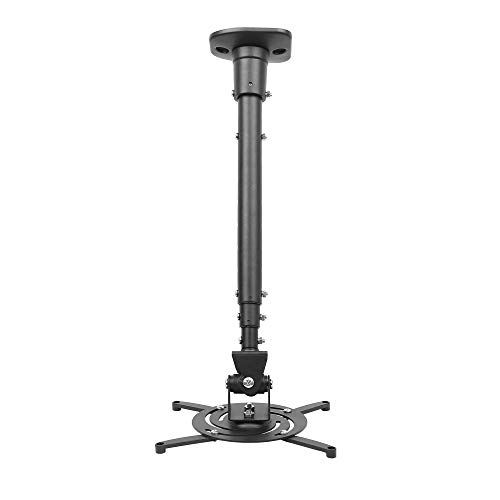
Best for rooms where you want flexible viewing angles, this mount supports most projector brands with a back-hole distance of 12.1 inches or less. It offers a 43.6-inch extension and a 23-inch collapsed length, plus tilt up to 25 degrees, swivel 90 degrees, and a full 360-degree rotation. It’s ideal for drivers who need to adjust between practice walls and dedicated hitting bays.
Limitations: The mount’s maximum load is 30 lbs (13.6 kg); ensure your projector weight falls within this limit to avoid strain or misalignment.
WALI PM-003-W Ceiling/Wall Mount

Best for higher load requirements and tight mounting spaces, this universal 3-in-1 bracket supports up to 44 lbs and transitions between ceiling and wall installation. It features a low-profile design and 16.9″–25.6″ ceiling extension, with +/-15° tilt and +/-8° swivel. Choose this if you have a heavier projector or a room that needs precise, compact positioning.
Caution: The mount does not fit vaulted ceilings or standard drywall in some configurations; verify your ceiling type and wall studs before installation.
ANYTHING SPORTS Complete Golf Simulator Enclosure Package

This all-in-one golf simulator enclosure includes a projector mount and frame poles, delivering a safe, contained practice zone with a 4K-ready impact screen and blackout cage. It’s designed for serious golfers who need a professional-looking setup at home or in a garage. The package prioritizes safety and clean aesthetics, helping you minimize stray balls and setup time. Note that turf and the projector shown are for demonstration and aren’t included.
Best for: home gyms or garages where space, safety, and a turnkey setup matter. Better for users who want an integrated enclosure rather than separate components.
KULAMOON Golf Simulator Projector Enclosure

Best for budget-conscious setups, this floor-mounted enclosure protects the projector while offering a cooling system. Its reinforced steel frame and impact-resistant acrylic window help shield the projector from golf-ball impacts. It’s ideal for spaces where a ceiling mount isn’t feasible or when you want ground-level placement. Note the acrylic panel’s protective film should be removed before use for clear projection.
Limitation: The floor enclosure limits ceiling clearance; check room height and projector throw to ensure proper alignment with your screen.
Buying Guide: Choosing the Right Golf Simulator Projector Mount
- Mount type: Decide between ceiling, wall, or enclosure options. Ceilings save floor space; walls offer flexibility in tight rooms; enclosures provide safety and a contained viewing area.
- Weight capacity: Check your projector’s weight and ensure the mount can support it. Exceeding weight ratings risks sagging or detachment.
- Adjustment range: Look for extendable arms, tilt, swivel, and rotation capabilities to dial in the perfect image and throw distance.
- Installation environment: Consider ceiling height, room layout, and presence of vaulted ceilings or studs. Some mounts exclude certain ceiling types.
- Cable management: Hidden routing helps maintain a clean setup and reduces trip hazards around your simulator area.
- All-in-one vs components: Enclosures simplify setup but limit access, while modular mounts offer customization at the cost of more assembly.
- Safety and durability: Steel construction and secure locking mechanisms reduce movement during use and ball impact risks.
Frequently Asked Questions
- What is the best type of projector mount for a golf simulator?
Answer: It depends on your space. Ceiling mounts save floor space and are common for golf simulators, while floor enclosures provide maximum protection for smaller rooms or shared spaces. - Can a ceiling mount support most projectors?
Answer: Most ceiling mounts support a wide range of projectors, but always verify weight ratings and mounting hole patterns for compatibility. - Do I need an enclosure for a safe golf practice space?
Answer: An enclosure improves safety and reduces ball deflection, especially in smaller rooms or active practice areas. - What maintenance is required for a projector mount?
Answer: Periodically check screws, arm joints, and tilt/swivel locks. Keep vents clear and ensure cables are secured to prevent wear. - How do I choose the right throw distance?
Answer: Measure from your projector’s lens to the screen and compare with the mount’s maximum extension to ensure a sharp image at the desired size. - Is a low-profile mount better for space-limited rooms?
Answer: Yes, low-profile mounts minimize visible profile and maximize headroom, especially in rooms with low ceilings.